

How to investigate a pricing page that AI crawlers rarely visit
Five checks, in order, before you rewrite a word of copy.

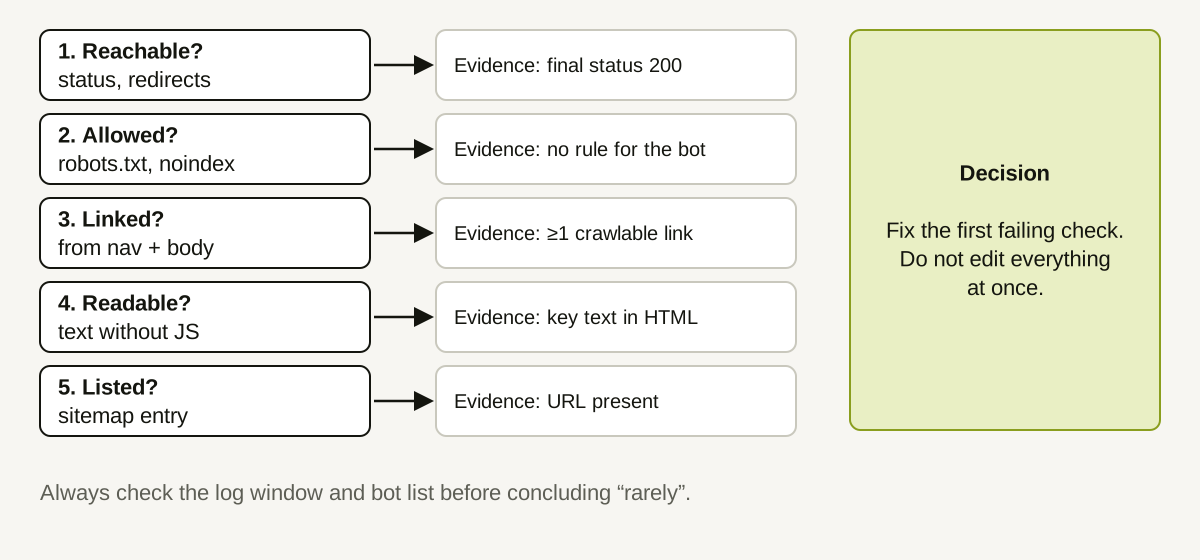
A common finding in log reviews: documented AI crawlers fetch your blog and docs regularly, but your pricing page barely appears. It is tempting to jump to a conclusion ("the assistants do not care about pricing") or to a fix ("rewrite the page"). Both skip the question that comes first: can the crawler reach and read the page, and does it have a reason to try?
This guide gives you an ordered investigation. The order matters because each step rules out a cheaper explanation before you spend effort on a more expensive one.
Step 0: Is "rarely" real?
Before investigating, check that the observation is solid.
- Window. Is your log window long enough? Two days of logs say little. Use at least a couple of weeks and state it.
- Comparison. Rarely compared to what? Pricing pages are small and change less often than blogs, so they may legitimately be fetched less. Compare against similar pages: your product, about, and comparison pages, not against the busiest blog post.
- Completeness. Are CDN-served or cached requests in your logs? If the edge answers the request, your origin log may not show it.
- Classification. Which bots are you counting? Count by claimed user-agent and be honest about the unknown class.
If the pricing page has no more requests than other low-change pages, there may be nothing to fix.
Check 1: Reachable
Request the page the way a crawler would and record the final status and number of redirects.
- A 200 on the first request is ideal.
- A redirect chain, a 403 to bot user-agents, or a 5xx is a finding. See how HTTP errors and redirects affect crawler access.
- Check that the URL linked from your own pages is the final URL.
Check 2: Allowed
- Read robots.txt and work out which group applies to each crawler you care about. A broad rule such as
Disallow: /pricingleft behind from a launch is a classic cause. See what robots.txt can tell you. - Check the page for
noindexin the meta robots tag or anX-Robots-Tagheader.noindexis a different mechanism from robots.txt and is easy to miss because it lives in the page or response headers. - Check for a canonical tag pointing somewhere else.
Check 3: Linked
Crawlers discover pages by following links. A page with no crawlable links to it is hard to find.
- Is /pricing linked from your main navigation as a plain HTML link, not only through a script-driven menu?
- Is it linked from relevant body content, such as the product page and comparison pages?
- Does the anchor text describe the destination? "Pricing" is better than "Learn more."
- Is it only reachable after a login, a form submission, or a region selector?
Check 4: Readable
A crawler that does not run JavaScript sees the HTML your server sends. Pricing pages are often built with scripts that fetch plan data after load.
- View the page source (not the rendered page). Do the plan names and prices appear in the HTML?
- Are the key facts (what each plan includes, how billing works) in text, not only in images or interactive toggles?
- Is the text clear without scrolling through three tabs?
If the key text is missing from the initial HTML, that is a hypothesis worth testing, not a proven cause: some crawlers may render scripts. Test, do not assume.
Check 5: Listed
- Is the URL in your sitemap, and does the sitemap load with a 200?
- Is the sitemap declared in robots.txt?
- Does the sitemap list the canonical URL, not a redirecting one?
A worked example (illustrative)
A team notices that over 30 days their blog receives hundreds of requests from claimed AI search crawlers and the pricing page receives two. They work through the checks:
| Check | Result |
|---|---|
| Reachable | /pricing returns 200 with no redirects |
| Allowed | robots.txt contains Disallow: /pricing under the wildcard group, left over from a pre-launch freeze |
| Linked | Nav link is a plain anchor; fine |
| Readable | Plan names and prices are in the HTML |
| Listed | In sitemap |
The first failing check is "Allowed." The team removes the leftover rule, notes the date, and decides to wait several weeks before drawing conclusions. They do not rewrite the page, because nothing suggests the copy was the problem.
Four weeks later the page shows more crawler requests. They record the result as consistent with the change, not proven to be caused by it: crawl behavior also depends on factors the team cannot see.
What not to conclude
- Do not conclude that low crawl frequency means low interest. Crawlers decide what to fetch by their own rules.
- Do not conclude that crawling more will lead to citations. A fetch is not a recommendation.
- Do not claim you know why the crawler skipped the page without evidence from the checks.
- Do not assume intent from the identity of a visitor. A crawler hitting pricing says nothing about a buyer.
How Doclight helps
Doclight's website audit covers several of these checks in one pass: it records HTTP status and redirect chain per page, evaluates robots.txt for documented answer-surface crawler names against your key pages (quoting the matching rule lines), flags unexpected noindex and canonical issues, and reports broken internal links. It extracts links with their anchor text and page region, and notes when a page may depend on JavaScript rendering, labelled as a hypothesis. Each finding is a recommended action with evidence you can verify, and a re-check can confirm whether the issue is still present.
It does not know how often a particular AI crawler visited a page unless your own pipeline sent those events, and it cannot say that fixing a finding will change a crawler's behavior.
Checklist
- "Rarely" confirmed against similar pages and a long enough window
- Reachable: 200 or minimal redirects
- Allowed: robots.txt group, noindex, canonical checked
- Linked: plain HTML links from navigation and body
- Readable: key facts in HTML text
- Listed: canonical URL in a working sitemap
- One change at a time, dated
Sources and verification
Product behavior was checked against the Doclight codebase on 2026-10-12. The investigation steps are standard technical-SEO practice, not claims about any specific crawler's rules. The log counts in the example are illustrative.