

What robots.txt can (and cannot) tell you about AI crawler access
A rule in a text file states a policy. It does not tell you who visited, who obeyed, or who will cite you.

robots.txt tells you which AI crawlers your site asks to stay away from, and which paths: find the group that matches a crawler's user agent, then apply that group's rules. It does not tell you whether a crawler visited, whether it obeyed, or whether an assistant will cite you, so read it as a stated policy, not as evidence of access.
If you have ever wondered whether AI assistants are allowed to read your website, robots.txt is where the answer starts. It is also where many answers go wrong, because a robots.txt file is easy to read badly. This article shows how to read it like a crawler does, what conclusions are safe, and what the file cannot tell you.
What robots.txt is
robots.txt is a plain-text file at the root of a host (https://example.com/robots.txt) that tells crawlers which paths they should and should not fetch. It is a convention formalized in RFC 9309. Compliance is voluntary on the crawler's side. Google's documentation puts the limit plainly: robots.txt is for managing crawler traffic and is not a mechanism for keeping a page out of Google, and a blocked URL can still appear in results without a description. It is also not access control. Do not put anything secret behind a Disallow line.
How a crawler reads it
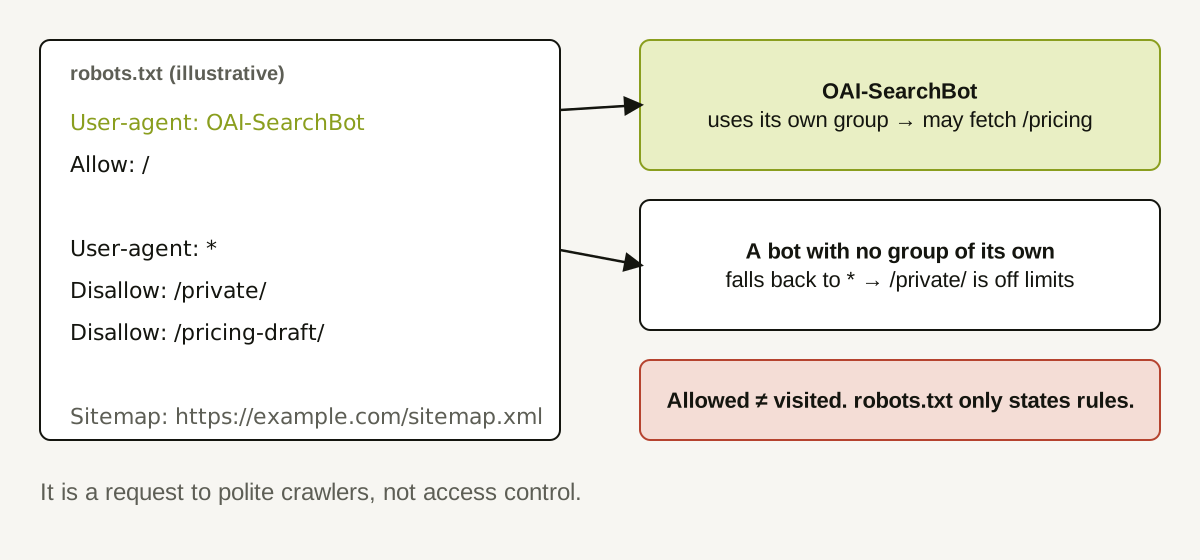
The file is organized into groups. Each group starts with one or more User-agent lines and is followed by Allow and Disallow rules.
TEXTUser-agent: OAI-SearchBot
Allow: /

User-agent: *
Disallow: /private/
Disallow: /pricing-draft/

Sitemap: https://example.com/sitemap.xml
The matching works like this:
- The crawler looks for a group that names its own token (for example
OAI-SearchBot). If one exists, it uses that group. - Only if no group names it does it use the
User-agent: *group. - It does not merge the two. A crawler with its own group ignores the wildcard group entirely.
That third point surprises people. In the example above, OAI-SearchBot has a group of its own, so the Disallow: /private/ rule in the wildcard group does not apply to it.
Tokens differ by purpose
The operators of AI products publish separate crawler names for different jobs, and the names control different things:
- OpenAI documents GPTBot (training), OAI-SearchBot (ChatGPT search features), and ChatGPT-User (requests triggered by a user, where robots.txt rules may not apply). It says the settings are independent, and that changes to search settings can take around 24 hours to take effect.
- Anthropic documents ClaudeBot (training), Claude-SearchBot (search quality), and Claude-User (user-directed retrieval), and says its bots honor robots.txt.
Because the tokens are independent, a blanket rule can be too broad. A Disallow: / under User-agent: * blocks every crawler without its own group, including ones you may want. Conversely, blocking GPTBot does not, by the operator's description, take you out of ChatGPT search; that is controlled by OAI-SearchBot.
What a robots.txt can tell you
- Which crawler tokens have rules written for them.
- Which paths a given token is told to avoid, by following the group-matching steps above.
- Whether a sitemap is declared.
- Whether the file is reachable (see the status-code article linked below).
What it cannot tell you
- Whether a crawler visited. A permissive file only says "you may." Visits are in server logs.
- Whether a crawler obeyed. Compliance is voluntary. Operators describe their intent; verify in logs.
- Whether you will be cited. Allowing a crawler is a precondition for some behaviors, not a cause of citations.
- Whether a page is indexed. Blocking crawling and blocking indexing are different mechanisms.
- How user-triggered fetchers behave. Some operators say robots.txt may not apply to them.
Common mistakes worth checking first
- A leftover launch rule. A
Disallow: /or a path rule added before launch and never removed. - Rules copied from another site. Paths that mean nothing on your site, or that block something they should not.
- Different files on different hosts.
www.example.comanddocs.example.comeach need their own file; fixing one does not fix the other. - Assuming the wildcard always applies. A named group replaces it for that crawler.
- Typos in the token. A misspelled user-agent name is just a group nobody matches.
A worked example (illustrative)
A SaaS company's file contains:
TEXTUser-agent: *
Disallow: /app/
Disallow: /pricing

User-agent: GPTBot
Disallow: /
The team wants to appear in ChatGPT search but not be used for training. Reading the file as a crawler does:
- GPTBot has its own group:
Disallow: /. Training crawl is blocked. This was intended. - OAI-SearchBot has no group, so it falls back to
*:/app/and/pricingare disallowed. The pricing page is blocked for search. This was not intended. - Claude-SearchBot and other crawlers also fall back to
*and are also blocked from/pricing.
The fix is a deliberate decision: remove Disallow: /pricing (if it was left over from a launch) or confirm it is intended. If they add a group for OAI-SearchBot, they must repeat any rules they still want, because the groups are not merged.
A safe audit checklist
- Fetch
/robots.txtfor every host that serves content (www,docs,blog). Each host has its own file. - List the groups and the tokens they name.
- For each token you care about, work out which group applies.
- Test your important URLs (home, pricing, docs, key articles) against that group.
- Write down intent for each Disallow line. Remove rules nobody can explain.
- Re-check after any deploy that touches the file.
- If you change it, give operators time to re-read it. Do not judge the result the same afternoon.
How Doclight helps
Doclight's website audit fetches robots.txt, stores the exact text, and evaluates it for documented answer-surface crawler names against your important pages. When a rule blocks one, the recommended action quotes the exact rule lines and lists affected URLs. The action is an investigate item because blocking can be deliberate; training-only crawlers such as GPTBot and ClaudeBot are never flagged. Our own audit crawler's access is handled separately, so a block against it is never reported as "AI bots are blocked."
The limits are important: the audit tells you what your rules say, not whether any crawler visited, and the re-check re-reads robots.txt only. Whether a crawler then visits is not observable from the audit.
Sources and verification
Checked on 2026-10-12: Anthropic's crawler article (read directly); OpenAI's crawler overview and Google's introduction to robots.txt (both read through search summaries because the pages were not directly reachable from the research environment); RFC 9309 (referenced for the group-matching convention; the full text was not retrieved in this pass). Re-verify before acting; crawler names and behavior change.
Related: how AI crawlers differ from human visitors and how HTTP errors and redirects affect crawler access.
Crawler access is one of several causes covered in why your company might not show up in ChatGPT recommendations.