

How to read agent request paths and identify access failures without inventing intent
A request table shows what was asked of your server and how it answered. It does not show why.

You have a table of requests from automated visitors: paths, status codes, counts. It is tempting to read it as a story: "agents are trying to compare our plans and getting blocked." That story might be right. The table, however, supports a much smaller claim. This article shows how to read request paths for what they actually demonstrate, how to find access failures, and how to avoid inventing intent.
If you have not yet set up telemetry, the previous article covers instrumentation. The reading rules below apply equally to ordinary server logs.
What a request row contains
A typical row has a path (sometimes a route template such as /products/:id), a method, a status code, a duration, a timestamp, and an identity label the request claimed (for example a user-agent string). That is the whole of it. There is no search query, no prompt, no reasoning, no goal, and no record of whether the visitor then did something useful with what it received.
What you can say, and what you cannot
| You can say | You cannot say |
|---|---|
| This path was requested N times in the window | Why it was requested |
| It returned 403 for N requests | That the visitor "wanted" the page and failed |
| Requests to this path were slow or errored | That the agent's task failed |
| This label appeared in the User-Agent header | That the vendor really sent it |
| No requests appear for a path | That nobody visited (a CDN may have answered) |
Keep that table nearby. Most overreach in this area is a sentence from the right column.
Step 1: Group by path and status
Count requests per (path, status), ignoring the identity label at first. Failures across many labels point at your site; failures confined to one label point at a rule aimed at it.
Step 2: Sort the failures by type
Each status class suggests a different next check:
- 401 or 403: access was refused. Look at your firewall, bot-protection and CDN rules, and at authentication on the path. Confirm whether the path is meant to be public.
- 404 or 410: the page is missing. Check for deleted content that is still linked, or a mistyped link in your own pages.
- 3xx: a redirect. Count hops and confirm where it ends. See HTTP errors and redirects.
- 429: rate limiting. Check whether your limit is aggressive for legitimate crawlers.
- 5xx: your server failed. Treat these as ordinary reliability bugs.
Step 3: Check that the path should work
Not every failing path is a problem. Ask of each: is it a page you want automated visitors to read? Your pricing page returning 403 to bots is worth a look. A private admin route returning 403 is the system working. Rank failures by the importance of the page, not by their count.
Step 4: Cross-check against what you declared
Compare with your robots.txt. A request that a rule disallows and that you answered 200 may indicate a crawler ignoring the rule, a rule that does not match what you meant, or a spoofed label; the data does not say which. A path you allowed that returns 403 suggests a firewall rule contradicting your stated policy. What robots.txt can and cannot tell you explains why robots.txt and server behavior can disagree.
Step 5: Be careful with identity and sessions
- Labels are claimed. Treat a "GPTBot" row as "a request that said it was GPTBot," unless you have verified it by a method the vendor documents.
- Without a supplied session identifier, each request is its own session. A sequence of paths from one label in one minute might be one agent, several, or a monitoring tool. Do not reconstruct a "journey" from independent rows.
Step 6: Check coverage before reading absence
If a path shows zero requests, ask whether your telemetry could have seen them. Middleware cannot see requests a CDN, edge cache or static host answered, or requests a web application firewall rejected before they reached your app. Absence in your table is not evidence of absence from the web.
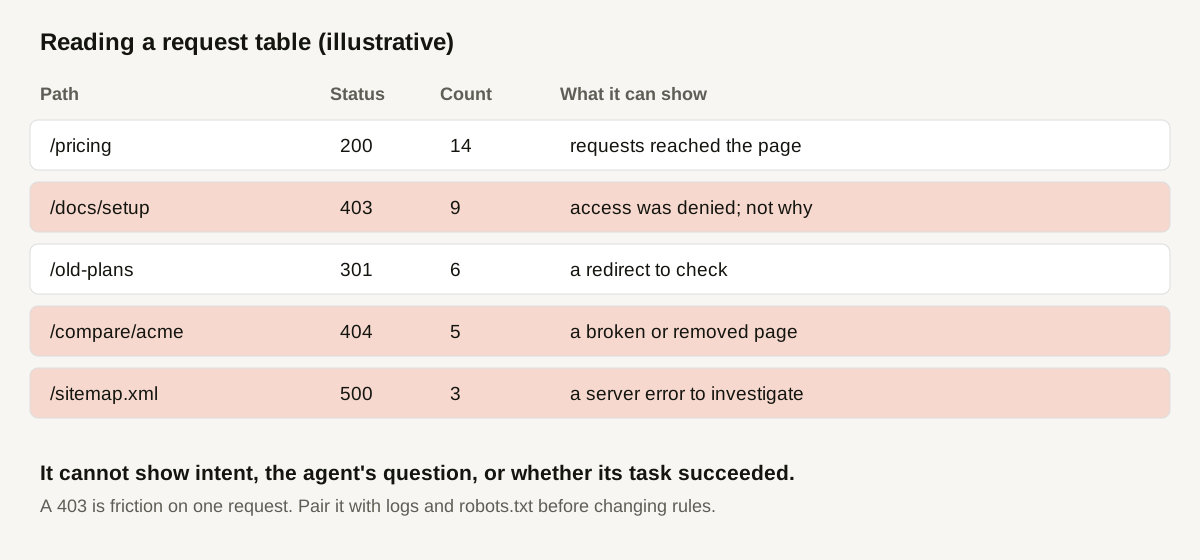
A worked example (illustrative)
A hypothetical team reviews one week of request telemetry for an Express site.
| Path | Status | Requests | First reading | Next check |
|---|---|---|---|---|
| /pricing | 200 | 14 | Reached the page | None |
| /docs/setup | 403 | 9 | Access denied on a page meant to be public | Inspect bot-protection rules for this path |
| /old-plans | 301 | 6 | Redirect from a retired URL | Confirm it ends on /pricing in one hop |
| /compare/acme | 404 | 5 | Removed page still requested or linked | Find the internal links pointing to it |
| /sitemap.xml | 500 | 3 | Server error on a key file | Open an engineering ticket |
The team writes four findings and one non-finding. Each states its evidence ("9 requests returned 403 on /docs/setup in the window") and a next check, and none states intent. In particular, they do not write "agents want our setup docs." They write that "requests for these docs were refused," which is what the table shows. All numbers are invented.
Writing findings that hold up
Use this template: what was observed, how many times, in which window, what it does not show. For example: "9 requests to /docs/setup returned 403 between March 1 and 7 from user-agents claiming to be crawlers. This shows the requests were refused. It does not show why they were made, that the labels are genuine, or whether crawlers elsewhere were also refused."
After the fix
Fix, then watch the same path over a comparable period. Requests returning 200 confirm that access is open, not that anything will be cited. See documenting content changes and the three-layer workflow.
How Doclight helps
Doclight's ingest keeps the evidence you need and no more: route as a path without query string, method, status, duration, the claimed agent name and vendor, and the referrer's origin only. Its website-agent-traffic view reports totals, per-agent and per-route request counts, HTTP failures (status 400 and above), aborted requests and the latest receipt time, and labels agent identity as observed but unverified. The route filter exists so a known safe request can be located to confirm that delivery works. A separate alert notifies you the first time a given bot type is observed, and states that its classification is derived from the user-agent and not verified.
Doclight does not infer what an agent was asking or whether its task succeeded, and it cannot see requests that never reached the instrumented application.
Checklist
- Requests grouped by path and status.
- Failures sorted by type and by importance of the page.
- Each failure checked against what the path should do.
- robots.txt and server behavior compared.
- Identity labelled "claimed" in every finding.
- Coverage limits checked before reading absence.
- Each finding states what it does not show.
Sources and verification
Checked on 2026-10-12 against this repository: docs/sdk-ingest.md (stored fields, failure counts) and marketing/content/docs/sdk/privacy-and-troubleshooting.mdx (what request data can and cannot show), and the first-observed-crawler alert section of METRIC_DEFINITIONS.md. No external research is cited and no customer logs are used. The table is illustrative.