

How to establish an AI visibility baseline for a SaaS brand
You cannot say you improved until you have written down where you started.

Most teams discover AI visibility the same way: someone types a question into an assistant, sees a competitor recommended, and asks "are we in there?" A week later someone else tries a different question and gets a different answer. Nothing is recorded, so nothing can be compared. A baseline fixes that. It is a single, documented, repeatable measurement you can return to when you change your docs, your pricing page, or your positioning.
This guide walks through building one for a SaaS product. It assumes you have a website, at least one named competitor, and an afternoon.
What a baseline is, and what it is not
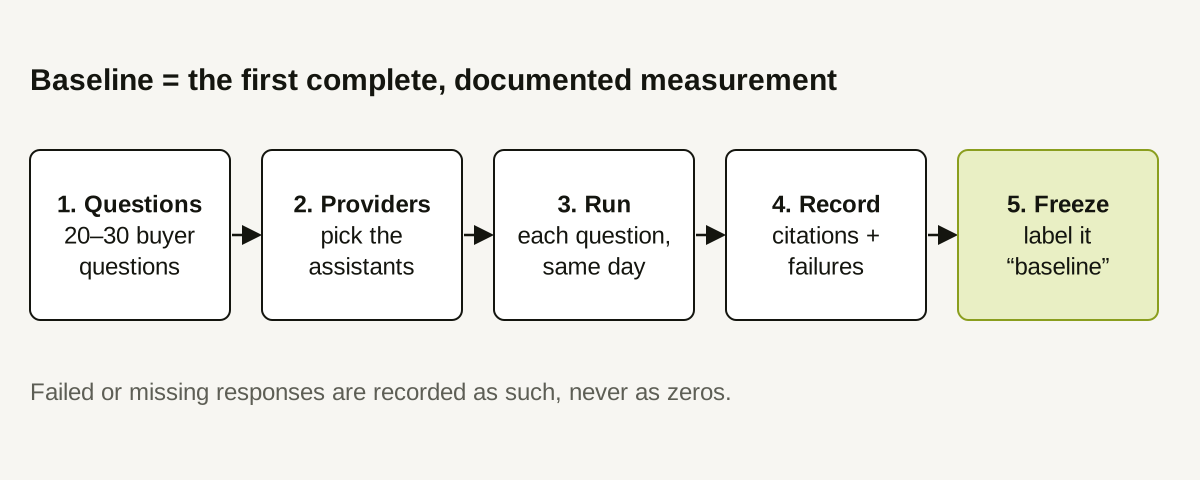
A baseline is the first complete measurement under a fixed method. Three words in that sentence do the work:
- First: later numbers are compared to it.
- Complete: it covers every question and provider you planned, and says plainly where something failed.
- Fixed method: the same questions, the same providers, the same way of counting.
A baseline is not a target, a score you must beat, or a claim about how the market behaves. It is a reference point. If your first measurement is poor, that is useful information, not a failure.
Step 1: Choose 20–30 buyer questions
Write the questions a real prospect would type, not keywords. Spread them across the buying journey:
- Problem questions: "How do I stop duplicate invoices in a small business?"
- Category questions: "What are the best invoicing tools for freelancers?"
- Comparison questions: "Acme Invoice vs Beta Billing for a 10-person team."
- Evaluation questions: "Does Acme Invoice integrate with accounting software?"
The count is a judgment call. Fewer than about twenty makes one odd answer swing the whole picture; more than thirty is hard to review by hand. Save the exact wording. Rewording a question changes the answer.
Step 2: Fix the scope
Decide and write down:
- Providers. Which assistants are you measuring? Do not assume more coverage than you have.
- Market. Which language and country do your buyers use? An answer to an English question for one country is not an answer for another.
- Competitors. Name the competitor domains you will compare against. Share-style metrics only describe the competitors you list.
- Your own domain. Include every domain and subdomain you want counted, such as
docs.andblog.subdomains.
Step 3: Run once, on one day
Run every question across every provider in a single session. Running across several days mixes real change with noise. Record the date.
AI answers vary from run to run, so a single run is one observation, not a verdict. Treat the baseline as a first reading and plan to repeat it before drawing strong conclusions.
Step 4: Record results and failures separately
For each response, save the full text and note:
- whether your domain was cited, and in what form (a full link or a bare domain);
- which competitor domains were cited;
- whether the response failed or came back empty.
Keep failures in the table. A response that errored is not a zero. It is missing data, and counting it as "not cited" will make your baseline look worse than reality and make later improvement look larger than it is.
Step 5: Compute a small set of numbers with named denominators
Compute only what you will use later:
- Citation rate: responses with at least one citation to your domain, divided by successful responses.
- Citation share: your citations divided by your citations plus those of the tracked competitors.
- Coverage: successful responses, failed responses, and providers that returned data.
If you want to understand how these differ, read how to interpret citation rate and citation share.
Step 6: Freeze it
Store the question list, scope notes, raw responses, and numbers together under a dated label. Do not edit it afterward. When you re-measure, you are comparing a new reading to a document that does not move.
A worked example (illustrative numbers)
The figures below are invented for illustration.
A SaaS invoicing tool tracks 24 questions on two providers: 48 responses. Three fail. That leaves 45 successful responses.
| Measure | Value |
|---|---|
| Successful responses | 45 of 48 |
| Responses citing the brand's domain | 9 |
| Citation rate | 9 ÷ 45 = 20% |
| Brand citations | 11 |
| Tracked competitor citations (3 competitors) | 29 |
| Citation share | 11 ÷ (11 + 29) = 27.5% |
The team writes: "Baseline, 12 October: 20% of successful responses cited our domain; 27.5% share against three tracked competitors; 3 of 48 responses failed." They also record that most brand citations came from comparison questions, and none came from problem questions. That detail will guide where to look first.
Common mistakes
- Changing the question list after the first run. Add new questions as a separate set instead.
- Counting failures as zeros. Report them separately.
- Mixing methods. If you switch from automated to manual checking, start a new baseline.
- Treating one run as truth. Repeat before concluding.
- Reading a trend into two points. With only a baseline and one later reading, you have a comparison, not a trend.
How Doclight helps
In Doclight you define the questions once, select the market, and add competitor domains. Each scan runs your questions against the assistants it integrates with, saves the full responses, and extracts citations. The report states the denominator for each figure, keeps failed and pending responses out of citation rate, and labels the period as having no data, sparse data (fewer than five successful responses), or sufficient data. When there is no earlier measurement, comparisons are labelled as a first measurement rather than a percentage change.
Two limits apply: Doclight counts links and domains, not brand names written without a link, and each scheduled scan runs each question once, so a single scan is one observation. Use the repeated scans over time to see consistency.
Checklist
- 20–30 buyer questions saved verbatim
- Providers, market, competitors, and domains written down
- All questions run on one day
- Failures recorded separately from "not cited"
- Rate, share, and coverage computed with stated denominators
- Results frozen under a dated label
Sources and verification
Product behavior was checked against the Doclight codebase and its metric definitions on 2026-10-12. All example figures are illustrative.