

How to instrument a website with a Doclight SDK for agent-request analytics
What the published Express middleware records, how to set it up safely, and what it cannot see.

Answer monitoring tells you what assistants said. Request telemetry tells you something different: which requests actually reached your server, including requests from automated agents. This article walks through instrumenting an Express website with the Doclight SDK, being precise about which version does what. It is deliberately short on code; the SDK documentation has the complete setup.
Two kinds of evidence, kept apart
Do not mix these up:
- Visibility monitoring runs tracked questions against assistants and records what they cite. It is measured by Doclight from outside your site.
- Request telemetry records requests your server handled: a route, a method, a status, a duration, and an identity label the request claimed. It is measured inside your site.
Request telemetry is not a visibility measure. A request from a crawler does not mean you will be cited, and a citation does not require a request you can see. AI crawlers versus human visitors covers how to sort traffic types.
What you need first
- A Node.js server (18 or later) running Express 4 or 5. Other frameworks have no dedicated adapter today; the Node client can send explicit events.
- A Doclight ingestion credential. In the backend's documented flow this is a scoped API key with the
ingestscope, created in the dashboard, shown once, and kept on the server. It is separate from the read/write keys used for the API and MCP, and an ingest key can only send events. - The brand's identifier as the project ID, and the ingest base URL. The backend documentation gives the endpoint as
https://api.doclight.app/api, because the SDK appends/v1/events/batch. The SDK's own default host does not reach this backend, so set the endpoint explicitly.
Step 1: Install the published version
BASHpnpm add @doclight/[email protected]
Pin the version. The public repositories are ahead of what npm published, and a README on GitHub is not evidence of what your installed package supports.
Step 2: Register the middleware once
JSimport express from "express";
import { doclightMiddleware } from "@doclight/express";

const app = express();
app.use(
  doclightMiddleware({
    apiKey: process.env.DOCLIGHT_API_KEY,
    projectId: process.env.DOCLIGHT_PROJECT_ID,
    endpoint: process.env.DOCLIGHT_ENDPOINT,
    express: { ignoreRoutes: ["/healthz", "/readyz"] },
  }),
);
Register it before the routes you want to observe, keep the key in the server environment, and exclude health checks and any sensitive paths. The documentation's full example also validates that the variables are present.
Step 3: Know what 0.1.0 records
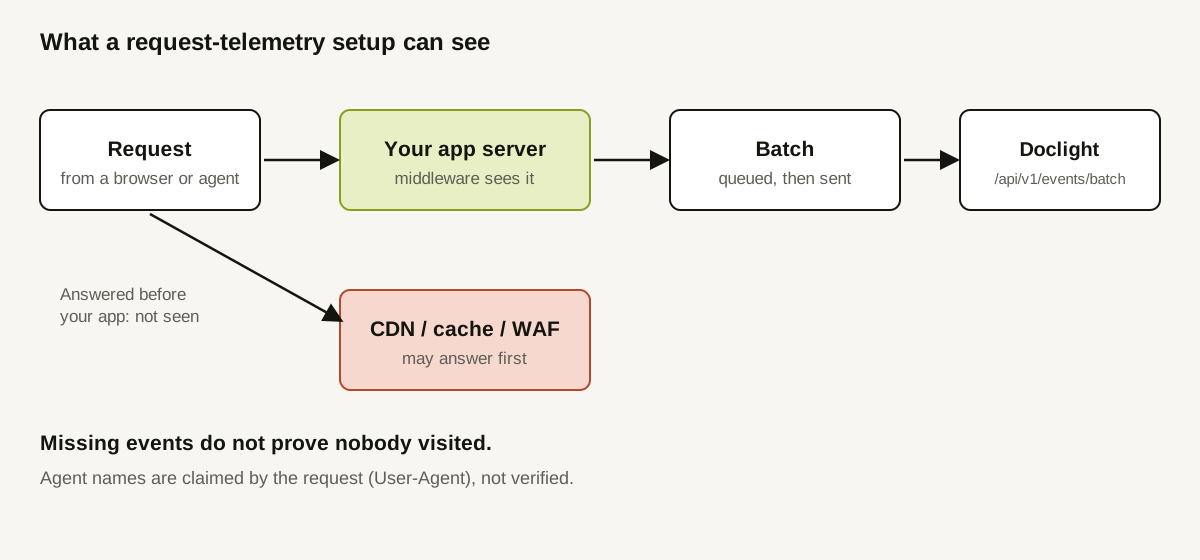
Per the SDK documentation, the published middleware queues one event per finished request, recording the route (a template when available), method, duration, success or failure status, the HTTP status code and a session identifier. It records all non-ignored requests; it does not classify user-agent tokens, collect referrer origins, or report aborted requests, and it has no public flush or shutdown, so abrupt termination can lose buffered events.
Step 4: Be careful about the match with the ingest service
This is the part to check rather than assume. As documented in this repository on 2026-10-12:
- The published 0.1.0 Express middleware sends events of type
api_called. - The Doclight ingest route persists
website_requestevents (and MCP tool and session events), and rejects other types per event, withunsupported_event_type. website_requestsupport exists in newer repository code, not in 0.1.0.
In plain terms: the published Express middleware and the website-agent-traffic dashboard panel are not documented as working together end to end, and the SDK documentation itself makes no promise of dashboard delivery for this release. Before relying on any number, confirm that your events were accepted. That is the reason to verify rather than trust.
Step 5: Verify without faking evidence
Send a clearly synthetic request to your own site:
BASHcurl -H 'User-Agent: GPTBot' -H 'x-doclight-session-id: smoke-001' http://localhost:3000/pricing
This sends a claimed identity. It is not a real GPTBot visit, so never record it as one. Then check three things separately: that your route responded, that the SDK reports the event as sent, and that the receiving side stored it. A 200 from your site proves only the first.
Step 6: Decide what you will and will not claim
Settle your reading rules now:
- Identity is claimed. User-agent strings and agent headers are client-controlled and can be spoofed.
- Coverage is partial. A CDN, edge cache or WAF may answer before your middleware runs.
- Sessions are per request unless a caller supplies a session identifier. Independent requests are not a journey.
- Privacy: the automatic integration does not record bodies, cookies or query strings, but values you supply are sent as given, so keep identifiers short and non-sensitive.
A worked example (illustrative)
A hypothetical team enables the middleware on a staging site and sends three synthetic requests.
| Check | Expected | Observed | Conclusion |
|---|---|---|---|
curl to /pricing | 200 from the site | 200 | Route works |
| SDK stats after the flush interval | 3 events sent | 3 sent | The client sent them |
| Receiver check | 3 events stored | 0 stored, 3 rejected as unsupported type | Event type mismatch: do not launch; pin versions and revisit |
The team notes the result in its launch checklist and does not publish any "agent traffic" numbers. All values are invented for illustration.
How Doclight helps
On the receiving side, Doclight's ingest route validates each event, deduplicates by event identifier so retries are safe, never stores request bodies, headers, cookies or query strings, reduces referrers to their origin, and reports accepted, rejected and duplicate counts with a reason per rejected event. The dashboard has a website-agent-traffic panel that reads only SDK-delivered website requests, shows agent identity as unverified, and counts HTTP failures separately.
Doclight cannot verify that a request really came from the vendor it claims, and it will not turn request data into a statement about what an agent was trying to do.
Checklist
- Express 4 or 5 on Node 18 or later.
- Ingest-scope key held on the server only.
- Package version pinned; docs for that exact version read.
- Endpoint set explicitly.
- Health and sensitive routes ignored.
- Synthetic test sent, labelled as synthetic.
- Receipt confirmed on the receiving side.
- Reading rules written: claimed identity, partial coverage.
Sources and verification
Checked on 2026-10-12 against this repository: docs/sdk-ingest.md (credential scope, endpoint, accepted event types, rejection reasons, storage) and the SDK pages under marketing/content/docs/sdk/ (Express, Node, privacy and troubleshooting), which describe npm 0.1.0. The public SDK repositories and the npm registry could not be reached from the research environment in this pass, so package contents were not independently re-inspected. Re-verify against the installed version before shipping. The test table is illustrative.