

How Doclight's MCP integration exposes product data to an AI assistant
A local server, a scoped key, four read tools, and a short list of write tools that you opt into.

Instead of opening a dashboard, you might want to ask an assistant: "How did our citation rate change this month?" The Model Context Protocol (MCP) is a standard way for an assistant to call tools exposed by a separate program, and Doclight ships such a program. This article explains how it works, what it can read and change, and how to set it up with the least access that does the job. Complete setup lives in the MCP documentation.
What MCP is, in one paragraph
MCP lets an AI client discover and call tools offered by a server. The client lists the server's tools and their input schemas, and the model decides when to call one. The protocol's specification describes tool annotations, which are hints about a tool's behavior, and the recent drafts say clients should treat annotations as untrusted unless the server is trusted. Earlier versions recommend a human in the loop who can deny tool calls. Either way, the practical lesson holds: do not rely on a tool's description to protect you. Rely on the credential's permissions.
Not to be confused with the SDK
Doclight has two things with "MCP" in the name:
- The Doclight MCP server (
doclight-mcp) lets an assistant read your Doclight data. This article is about it. @doclight/mcp, an npm package, instruments an MCP server you build, to record tool timing and errors. It is part of the SDK, and installing one does not install the other.
The three parts
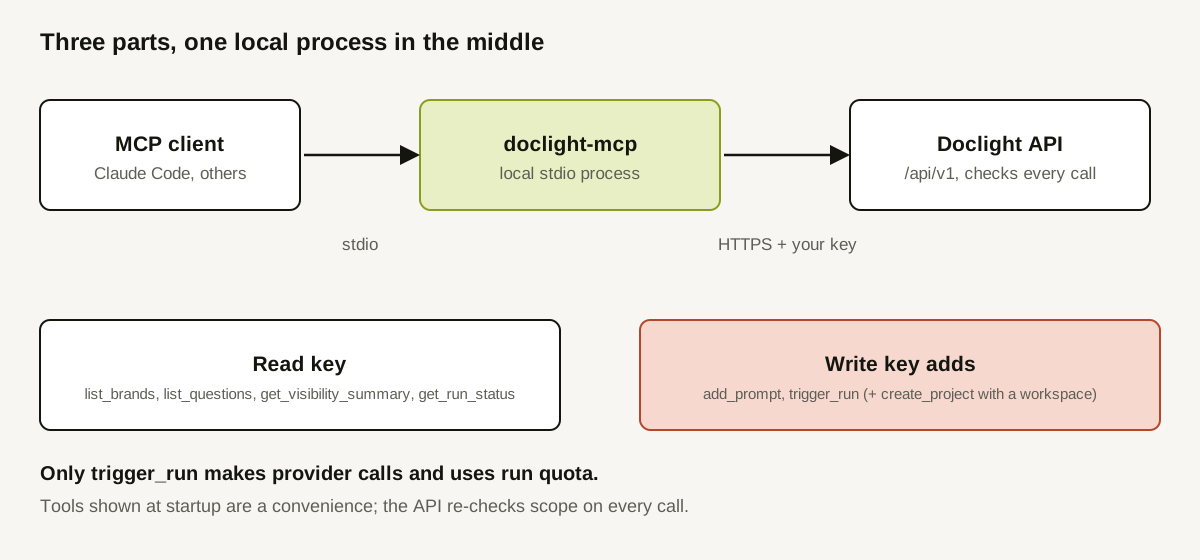
- The client (Claude Code or another MCP-capable assistant) starts the server as a child process and talks to it over standard input and output.
doclight-mcpis a small local Python program. It turns tool calls into requests to Doclight's versioned/api/v1API using the key inDOCLIGHT_API_KEY.- The Doclight API holds your data and enforces access on every request.
Note what is not there: no hosted URL to paste into a client, and no OAuth sign-in. It is a local program authenticated with an API credential, so clients that only accept a remote URL cannot use it today.
The tools
Four read tools exist for any valid key:
| Tool | What it returns |
|---|---|
list_brands | The brands (projects) the key can read, paginated |
list_questions | A brand's tracked questions, with language, market, status and providers |
get_visibility_summary | The report summary for a trailing window of 1 to 365 days: citation share and rate, provider coverage and data sufficiency |
get_run_status | Status and response counts of a measurement run (the latest if none is named) |
Read tools do not start measurements and do not spend provider quota.
Write tools appear only for a key with write scope: add_prompt (creates a tracked question, paused unless you ask for active), trigger_run (starts a measurement for explicit questions, which makes paid provider calls and uses a daily manual-run allowance), and, if the key is also authorized for a workspace, create_project. They are annotated as non-destructive, and their descriptions begin with MUTATION so a client can ask you to confirm. Nothing deletes anything.
Least privilege: pick the smallest key
- Start with a read key, bound to the specific brand(s) you want the assistant to see. Credentials cannot be edited after creation, so make a new one if your needs change.
- Add write scope only if you need it, and recognize that
trigger_runcosts money and quota. - Keep the key out of source control and out of the assistant's conversation. The server does not print the key and reports errors with fixed, safe text.
- Restart the client after changing a key: the tool list is decided at startup.
The API re-checks everything on every call: revocation, rate limit (60 requests per 60 seconds by default), scope, paid access, and current brand membership. Brands outside the key return "not found," not "forbidden," so identifiers are not disclosed.
What an assistant can usefully do with it
Reasonable requests: "list my brands," "summarize the last 30 days for brand 12 and say what coverage was missing." Risky ones would run a measurement without you meaning to, so prefer read-only keys for exploratory chat.
What an assistant should not conclude
The summary is a measurement through provider APIs, and may differ from what a consumer chat product displays. An assistant that tells you "your visibility fell because of X" is guessing about X: the tools carry measurements, not causes. Ask it to quote the denominators and the coverage status alongside any number, and to say when data sufficiency is "sparse."
A worked example (illustrative)
A hypothetical marketer wants a weekly summary in their assistant.
| Step | Action | Why |
|---|---|---|
| 1 | Create a read-scope key limited to one brand | Minimum access |
| 2 | Install the server and register it with the client, with the key in DOCLIGHT_API_KEY | Local stdio server |
| 3 | Ask: "Call get_visibility_summary for 7 days; report rate, share, denominators and coverage" | Forces context with the number |
| 4 | Read the answer against the dashboard once | Verify the first time |
| 5 | Leave write keys for a separate, deliberate setup | Avoid accidental quota use |
The result is a short summary in the assistant, and no way for it to start a run. The steps are a plan, not a real transcript.
Limits to know
- There is no scheduling, bulk setup or deletion through MCP.
- The server is local stdio only.
- Provider execution is at-most-once per dispatch, not exactly-once, and a timed-out call may still have been processed.
How Doclight helps
Beyond the tools themselves, Doclight audits creates and rejected duplicates, enforces the plan's project, prompt and run limits, and describes each tool's inputs and outputs in the documentation, including read tools, write tools and permissions and limits. To combine MCP data with other evidence, see the three-layer workflow.
Doclight cannot make an assistant interpret numbers correctly, which is why reading the denominators remains your job.
Checklist
- Read-scope key, bound to the brands you need.
- Key stored in the environment, not in files in a repository.
- Client restarted after any key change.
- Assistant asked to report denominators and coverage with each number.
- Write scope granted only deliberately, with the quota cost understood.
- First answers checked against the dashboard.
Sources and verification
Checked on 2026-10-12 against this repository: mcp-server/README.md, the MCP documentation under marketing/content/docs/mcp/, docs/public-api-v1.md, and CLAUDE.md. For the protocol, the MCP specification's tools page was read through a search-result summary only, because the page could not be fetched in this pass: it indicates that the 2025-03-26 and 2025-06-18 versions recommend a human in the loop, and that the draft says clients must treat annotations as untrusted unless the server is trusted. Check the specification for the version your client implements. The published doclight-mcp package and its public repository were not independently inspected. The worked example is a plan, not a recorded session.