

How to combine SDK telemetry, crawler analysis and answer monitoring in one workflow
Three signals answer three different questions. Join them as hypotheses, not as a chain of cause and effect.

Teams that take AI visibility seriously end up with three kinds of data: what assistants say about them, what automated visitors can read on their site, and what actually hit their servers. Each is useful. Each is also easy to misread, and the temptation is to chain them into a tidy story: "the crawler visited, so we got cited." This article describes a workflow that uses all three while keeping each one honest.
The three layers
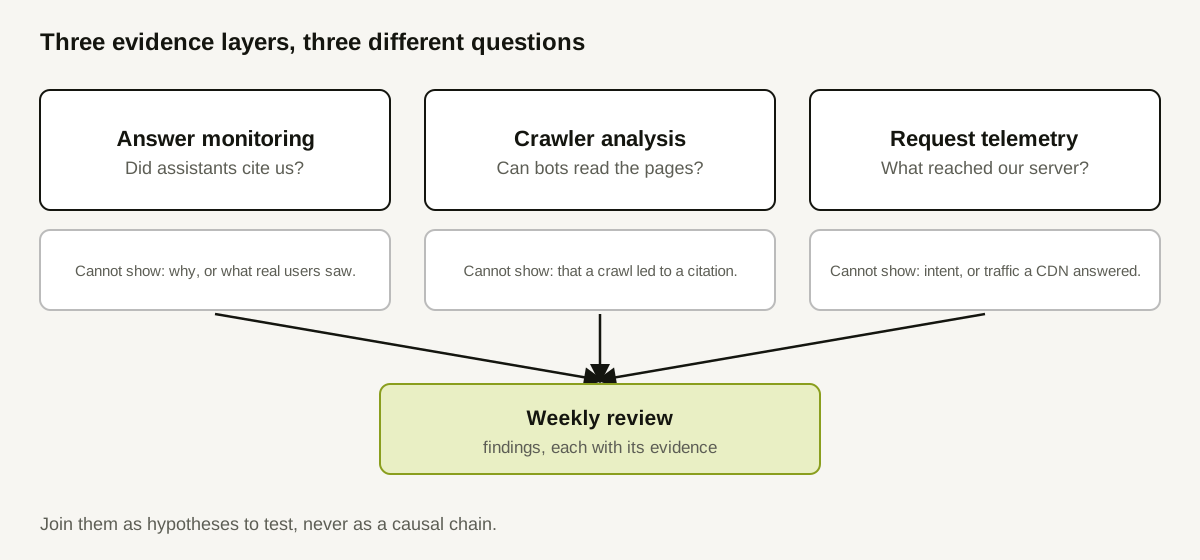
Answer monitoring asks: did assistants cite us, for which questions, on which providers? It measures outcomes from outside your site. It cannot tell you why, and API measurements may differ from what a consumer app shows.
Crawler analysis asks: can automated visitors read the pages that matter? It looks at robots.txt, status codes, redirects, rendering and page content. It describes access and readability. It cannot show that a crawl led to a citation.
Request telemetry asks: what requests reached our server, and how did it answer? It records routes, statuses and claimed identities. It cannot show intent, and it misses traffic a CDN or cache answered. The earlier article on instrumentation covers setup and a version caveat worth reading first.
Why joining them is hard
The layers are measured at different places, with different identities, on different clocks:
- A citation names a domain or URL in an answer.
- A crawler finding names a URL and a check result.
- A request row names a path, a status and a claimed agent.
They line up on URLs, but not on causes. A page can be requested and never cited. It can be cited without any request you can see. Nothing in the data links a specific request to a specific answer, so treat every link between layers as a hypothesis.
The workflow
Run it weekly, in this order. Pair it with a sixty-minute weekly routine if you already have one.
1. Start with coverage
For each layer, record what was and was not measured this week: failed provider runs, crawl pages that errored, telemetry gaps such as a deploy that skipped the middleware. A number from an incomplete layer is flagged, never silently compared.
2. Read each layer alone
Write one-line findings per layer, with evidence and scope:
- Answers: "Brand cited on 9 of 40 tracked questions (successful responses only)."
- Crawler: "/pricing returns 200 but is disallowed by the wildcard group."
- Requests: "/docs/setup returned 403 to 9 requests with crawler-like labels."
No causes yet.
3. Join on a URL or question, and label the join
Where two layers touch the same page, write the join as a hypothesis:
/pricing is disallowed in robots.txt (crawler layer) and is not among the cited pages for pricing questions (answer layer). Hypothesis: the page cannot be fetched by crawlers that respect the rule. Test: change the rule, then re-measure the pricing questions.
Joins are only candidates. A page missing from citations has many possible reasons; the join narrows your first check.
4. Rank by evidence and effort
Rank findings with measured, verifiable problems first (for example, a key page that returns an error), then diagnoses that need investigation, then data gaps. Turning evidence into an action list covers the ranking method in detail. Keep each item's expected change modest.
5. Decide what to re-measure, and when
For each action, name the layer that will confirm it and the date. Access fixes are confirmed by the crawler and request layers. Outcome changes can only be seen in the answer layer, after enough runs. Comparing before and after covers the logging.
Rules that keep the workflow honest
- Never state intent. Request data shows requests, not goals.
- Never call claimed identity verified. A user-agent string can be spoofed.
- Never read absence as non-visit. Telemetry has coverage gaps.
- Never claim causation across layers from timing alone.
- Keep API and chat-app caveats attached to answer numbers.
- Separate access problems from provider failures. A provider outage is a measurement gap, not a website issue.
A worked example (illustrative)
A hypothetical SaaS team reviews its week. Every figure is invented.
| Layer | Finding | Evidence | Limit |
|---|---|---|---|
| Answers | Brand not cited on 6 pricing and comparison questions that were measured successfully | 6 questions, 2 providers, 4 to 5 successful responses each | Why is unknown |
| Crawler | /pricing disallowed for the wildcard group by a leftover rule | robots.txt lines 4 and 5 | Does not show a crawl would lead to citation |
| Requests | 5 requests to /pricing in the week, all with a browser label; none with a crawler label | Telemetry table | CDN may have answered some bot requests |
| Join | Pricing is blocked in robots.txt and absent from pricing-question citations | The three rows above | A hypothesis, not a finding |
Action: remove the leftover rule, confirm in the crawler layer, and re-measure the six questions after a stated number of runs. The team writes down what would count as no effect, and does not promise citations.
Where this workflow stops
It does not prove ranking mechanics, which providers do not publish. It does not cover traffic or revenue. It cannot identify every agent, since many do not announce themselves.
How Doclight helps
Doclight measures the answer layer through scheduled and manual runs of your tracked questions, and its recommended-actions engine combines crawl evidence from site audits, visibility measurements and agent runs into findings that each carry their evidence; an optional crawler-gap hypothesis is explicitly flagged as a hypothesis. Its website audit records status codes, redirect chains and robots.txt evaluation. SDK ingestion can store website request events and shows them in a separate website-agent-traffic view with unverified identity, kept apart from visibility measurement, and the Doclight MCP server lets an assistant read the visibility layer on request (see how the MCP integration works). If the audit crawler itself is blocked, that is reported as a coverage limit of the audit, never as "AI bots are blocked."
Which request types the dashboard can show depends on the SDK version you run and on what the ingest service accepts, so verify receipt before you rely on that layer. Doclight does not join requests to answers for you, and it cannot show that one caused the other.
Checklist
- Coverage recorded for all three layers before any number is quoted.
- One line per layer, with evidence and scope.
- Joins written as hypotheses with a test.
- Findings ranked by evidence, then effort.
- Each action tied to the layer that will confirm it, with a date.
- Identity labelled claimed; intent never inferred.
Sources and verification
Checked on 2026-10-12 against this repository: METRIC_DEFINITIONS.md (recommended actions, crawler-gap hypothesis, first-observed-crawler classification), docs/sdk-ingest.md (ingest and dashboard read surface, accepted event types), and the SDK privacy and troubleshooting documentation (what request data can and cannot show). No external research is cited and no customer data is used. The table is illustrative.