

How to document content changes and compare AI visibility before and after
A change log, matching windows, and a careful sentence about what the difference means.

A page was rewritten on the 3rd. By the 24th, your brand is cited more often. Success? Possibly. It is also possible that a provider changed its behavior, that you ran more questions, or that last week's measurement partly failed. A before-and-after comparison can be informative, but only if you set it up before you look at the result. This article shows how.
The core idea
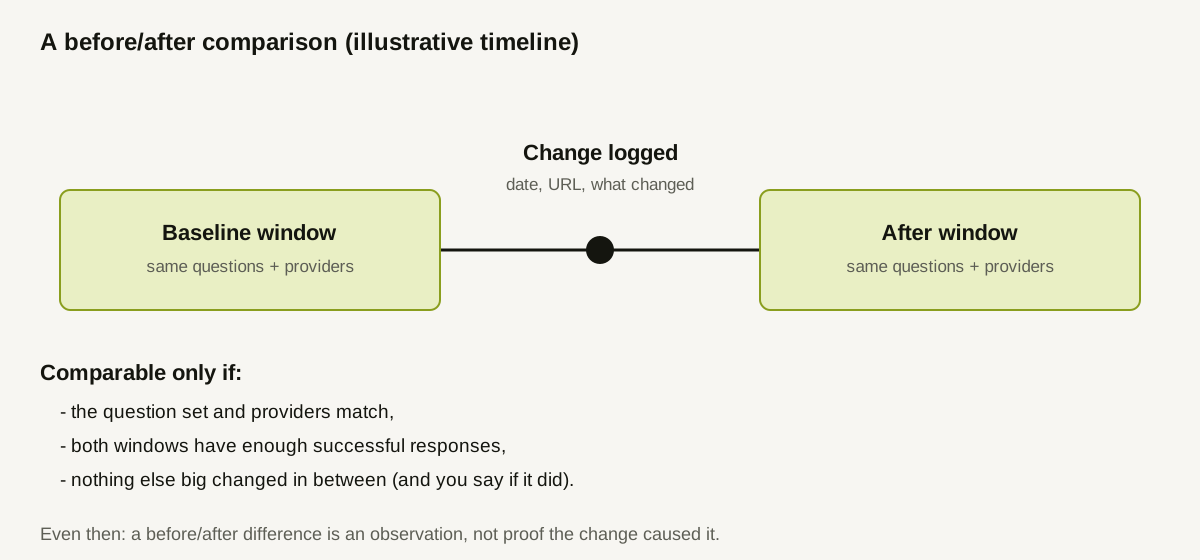
You are comparing two measurement windows separated by a change. For the comparison to mean anything, three things must hold:
- The change is recorded precisely, with a date.
- The measurement is comparable on both sides: same questions, same providers, same method.
- The claim is modest: "after this change, the measured rate was X, compared with Y before," never "this change caused the increase."
Step 1: Keep a change log
A change log is a short table, kept where your team will actually update it. For each change, record:
- Date and time the change went live (not the date it was drafted).
- URL(s) affected.
- What changed: new page, rewritten section, added table, fixed redirect, unblocked crawler.
- Why: the hypothesis, in one sentence, ideally linked to the finding that prompted it.
- Which questions you expect it to affect.
- Owner.
Add a line for other changes made around the same time, including site-wide ones such as a redesign, a migration or a robots.txt edit. These are the confounders a skeptical reader will ask about.
Step 2: Change one thing at a time where you can
If you rewrite five pages and fix a robots rule in one week, you cannot say which mattered. When changes must ship together, log them as a bundle and report the result as the bundle's. Where possible, stagger them so each has its own window.
Step 3: Take a baseline before the change
Run your tracked questions before the change ships, over a window long enough to hold several successful responses per question. A baseline taken after the change is not a baseline. If the change has already shipped, say so, and treat the earliest clean measurement as the best available comparison, with that caveat attached.
Step 4: Keep the measurement comparable
A comparison is fair only if:
- the question set is the same (an edited question is a different question; note when wording changed),
- the providers measured are the same, and none was failing in one window,
- the market settings match,
- both windows have enough successful responses to read.
If any of these differ, the result is not a controlled before-and-after. You can still report both numbers, but you must label the comparison as non-comparable and avoid reading a trend.
Step 5: Wait long enough, and say how long
Assistants may take time to reflect a changed page, if they do at all. There is no published delay you can rely on, so avoid inventing one. Decide in advance how many measurement cycles you will wait, and write that down before looking at results. Peeking daily and stopping when a number looks good is a classic way to mislead yourself.
Step 6: Report the difference carefully
Describe the two windows, give both numbers with denominators, state the change in percentage points, and list what else changed. Use wording such as:
"On the 12 questions related to the updated page, the brand citation rate was 17% (3 of 18 successful responses) in the 14 days before the change and 33% (6 of 18) in the 14 days after. The question set and providers were identical. No other content change on those topics is logged. This is an observation, not evidence that the change caused the difference."
A worked example (illustrative)
A team rewrites its "import data" guide on March 3 after finding that a competitor's import documentation was cited for three tracked questions. All numbers are invented.
| Item | Before (Feb 17 to Mar 2) | After (Mar 3 to Mar 16) |
|---|---|---|
| Questions in scope | 12, unchanged | 12, unchanged |
| Providers measured | 3 | 3 |
| Successful responses | 18 | 17 |
| Responses citing the brand | 3 | 6 |
| Citation rate | 17% | 35% |
| Other logged changes | none | none |
The change is +18 points on small numbers (18 and 17 responses). Reasonable wording: "the rate rose from 17% to 35% on these questions; the sample is small, so we will keep measuring for two more cycles before drawing a conclusion." Unreasonable wording: "the rewrite doubled our visibility." The team also notes that one response was pending in the second window and excludes it from the denominator.
When the result is flat or negative
A flat result is informative: the change may be harmless but insufficient, the page may not be reachable by the crawlers that matter, or the real driver may lie elsewhere. A negative result may reflect provider variation. Log it either way. Teams that only record the wins end up with a log that cannot teach them anything.
What a good change log buys you
Months later, someone asks why a page looks the way it does, or whether an old tactic worked. The log answers with dates and numbers instead of memory. It also protects you in client conversations: you can show exactly what was changed and what was measured, and avoid retrofitting a story.
How Doclight helps
Doclight versions tracked questions: editing a question's wording, language or target country creates a new version with an automatic change note, and recorded responses keep pointing at the version they ran under, so history is never rewritten. After you act on a recommended action, a re-check re-fetches the affected pages for technical and content issues and reports whether the problem is resolved, still present, or inconclusive. For visibility actions, it records the latest completed run as a baseline and later compares it with the first run completed after the re-check, using successful-response denominators, and the result is explicitly flagged as not claiming causation. Archived calendar-month and quarter snapshots can be compared only when providers, question sets and locales are comparable; otherwise the reasons are listed and no deltas are shown.
Doclight does not log your site changes for you, so keep your own change log. It also cannot isolate the effect of one change from everything else that happened.
Checklist
- Change logged with date, URL, description, hypothesis and owner.
- Other nearby changes logged as possible confounders.
- Baseline measured before the change.
- Same questions, providers and market on both sides.
- Wait time decided before looking at results.
- Both numbers reported with denominators, in percentage points.
- Wording says "observation," not "proof."
Sources and verification
Checked on 2026-10-12 against this repository: METRIC_DEFINITIONS.md (recommendation re-checks and comparison with causal_claim: false, question versioning, report snapshot comparability) and backend/app/questions/service.py (versioning on edits). No external research is cited. The change log entries and all numbers are invented for illustration.