

A repeatable weekly AI visibility monitoring routine (60 minutes)
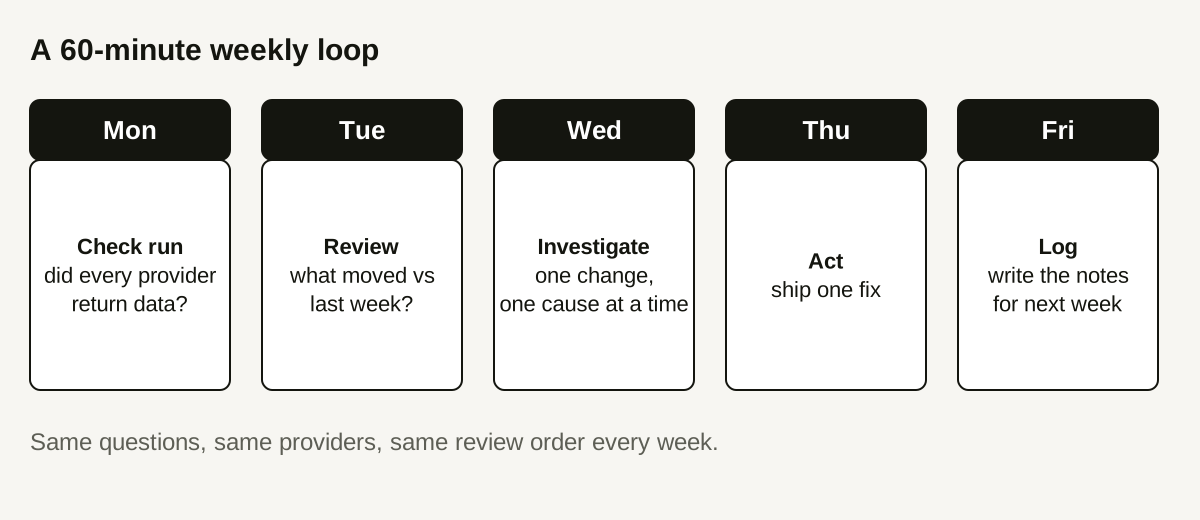
Check the run, review changes, investigate one thing, ship one fix, write it down.

Dashboards get opened enthusiastically for two weeks and then ignored. The usual cause is not a lack of data but a lack of routine: nobody decided what to look at, in what order, and what counts as worth acting on. This guide gives you a one-hour weekly loop for AI visibility monitoring that a single person can run, with a decision rule that stops you chasing noise.
It assumes you already have a baseline. If not, start with how to establish an AI visibility baseline.
The principle: boring and consistent beats clever
AI answers vary from one run to the next. A weekly check is noisy by nature, so the value comes from consistency: the same questions, the same providers, the same review order, the same notes. When something moves, you want to be able to rule out "we changed how we looked" before you consider "the world changed."
Setting up before week one
The loop is only easy if the setup is done once and done well. Spend an hour before your first run:
- Freeze the question list. Save it with a version date. When you add questions, add them as a new batch so earlier weeks stay comparable.
- Name an owner and a fixed slot. A recurring calendar block with one named person beats a shared intention. If the owner is away, name a substitute rather than skipping.
- Decide what counts as a change worth noticing. For example: a swing of more than a few responses on a question you care about, or any provider failing. Write the threshold down so you are not negotiating with yourself every Tuesday.
- Create the notes document. Paste the template below, and keep one entry per week in the same file so you can scroll back.
- List your known site changes. Keep a short log of launches, migrations, and robots.txt or redirect edits. When a movement appears, you will check this log first.
Keeping the hour honest
A few habits keep the routine from growing:
- Stop at the end of each step even if you are curious. Curiosity goes into next week's notes.
- Resist adding new metrics. Every extra number is another thing to explain.
- If two weeks in a row end with "no action," that is fine. A stable result is information.
- Once a quarter, spend a longer session on the questions themselves: remove ones nobody asks and add new buyer questions as a new batch.
The five-step loop
1. Check the run (10 minutes)
Before reading any metric, confirm the measurement worked:
- Did the scheduled run complete?
- How many responses succeeded, failed, or stayed pending?
- Did every provider return data, or did one return only errors?
- Did anyone change the question list since last week?
If coverage is incomplete, note it and treat this week's movement as provisional. See how to separate incomplete coverage from low visibility for the full reasoning.
2. Review changes (15 minutes)
Look at the same four views every week, in the same order:
- Citation rate, with the response count behind it.
- Citation share against your tracked competitors, in percentage points.
- Questions where you gained or lost a citation.
- New domains cited alongside you.
Write down what changed in plain words. Do not interpret yet.
3. Apply the investigation rule (15 minutes)
Pick at most one movement to investigate. Choose it by this rule:
- It affected a question that matters to a buyer decision, and
- it is larger than one or two responses, and
- coverage was complete for that question and provider.
Everything else goes in the notes as "observed, not investigated." This rule exists because the temptation each week is to explain every wiggle. Most wiggles are run-to-run variation, and explaining them creates confident stories with no evidence.
Open the raw responses behind the movement. Read at least three. What changed in the answer? Which sources were cited instead?
4. Ship one fix (15 minutes)
If the investigation points to a concrete page problem (a missing answer in the first paragraph, a blocked page, a broken link), ship the smallest fix you can and note exactly what you changed and when. One change per week keeps cause and effect readable.
If it does not, the right action may be to do nothing and re-check next week. That is a valid outcome.
5. Log it (5 minutes)
Write the notes before you close the tab. Future you will not remember.
A notes template
Copy this into a doc and fill it in every week:
TEXTWeek of: 2026-10-12
Coverage: 48 responses attempted, 45 succeeded, 3 failed (provider B)
Questions changed since last week: none
Rate: 20% (9/45)   Share: 27.5% (11/40)   Change: +2.5 pp share
Observed: gained a citation on "best invoicing tool for freelancers"
Investigated: that question - 3 responses read
Hypothesis: comparison page now answers the question in its first paragraph
Action: none this week; re-check next week
The numbers in that template are illustrative.
A worked example (illustrative)
In week 3, a team sees citation share drop 8 points. Following the routine:
- Check the run. Provider B failed on 12 of 24 questions. Coverage is incomplete.
- Review changes. The drop is concentrated in provider B's questions.
- Apply the rule. Coverage was not complete for the affected provider, so the rule says do not investigate the content. Log it as provisional.
- Ship one fix. None. They open a ticket to check why provider B failed.
- Log it. "Share −8 pp, provider B coverage 50%, provisional."
In week 4 the provider recovers and share returns to its previous range. Had the team rewritten pages in week 3, they would have "fixed" a measurement gap.
When to escalate beyond the weekly loop
Some signals deserve attention outside the routine:
- A competitor appearing for questions you consistently owned, for two or more weeks in a row.
- Any provider failing for more than a week.
- A change in how many sources an assistant cites, visible across many questions.
- A site change (migration, redirect, robots.txt edit) shipped by anyone.
How Doclight helps
Doclight runs your tracked questions on a schedule and saves every response, so the weekly review starts from the same data each time. The report separates successful, failed, and pending responses, shows which providers were actually measured, and flags periods as no data, sparse, or sufficient, so step 1 is quick. Recommendations carry a status you can set (open, planned, reported as implemented), and a re-check can update that status, which gives step 4 a place to live. Comparisons say "no baseline" instead of a percentage when no earlier measurement exists.
What it does not do: it does not tell you why a movement happened, and it cannot promise that a fix will lead to a citation.
Checklist
- Run health checked before any metric
- Same four views, same order
- At most one investigation
- At most one change shipped
- Notes written before closing
Sources and verification
Product behavior was checked against the Doclight codebase on 2026-10-12. The example is illustrative; no customer data is used.