

How HTTP errors and redirects affect AI crawler access to your important pages
A 301 chain, a stray 403, or a 5xx on robots.txt can quietly shut a door you thought was open.

Before a crawler can read your carefully written page, your server has to hand it the page. That conversation is made of HTTP status codes, and a surprising number of access problems are really status-code problems: an old URL that redirects through three hops to an error, a firewall that answers a bot with 403, a deploy that makes robots.txt return 500. This article walks through each class of status code and what it can mean for access to your important pages.
One caution first. Operators document some of this behavior (Google, for instance, publishes how its crawlers treat each class). Most AI crawler operators publish less. Where they do not, treat the standard web behavior below as a reasonable expectation to verify, not a guarantee.
2xx: the page is fetchable
A 200 means the server returned content. Good, but check two things:
- Does the content contain what you expect? A 200 can still return a login wall, a cookie wall, or an empty shell that depends on JavaScript to fill in. A crawler that does not run scripts sees the shell.
- Is the URL the one you want crawled? If a page is reachable at several addresses, pick a canonical one and link to that.
3xx: redirects
A redirect tells the crawler "the content lives elsewhere." Redirects are normal and often necessary, but each hop is a place where a fetch can stop.
- Chains.
/plans→/pricing/→/pricingis two hops. Crawlers cap how many hops they follow. Google, for example, documents following at least five hops for robots.txt before treating it as an error, and other crawlers may follow fewer. Fewer hops is safer. - Permanent versus temporary. A 301 or 308 signals a permanent move; a 302 or 307 signals a temporary one. Using a temporary code for a permanent move can leave the old URL in use.
- Redirects to errors or irrelevant pages. Redirecting a retired page to the home page rather than a close match is a common source of "soft" problems.
- Loops. Two URLs that redirect to each other will never resolve.
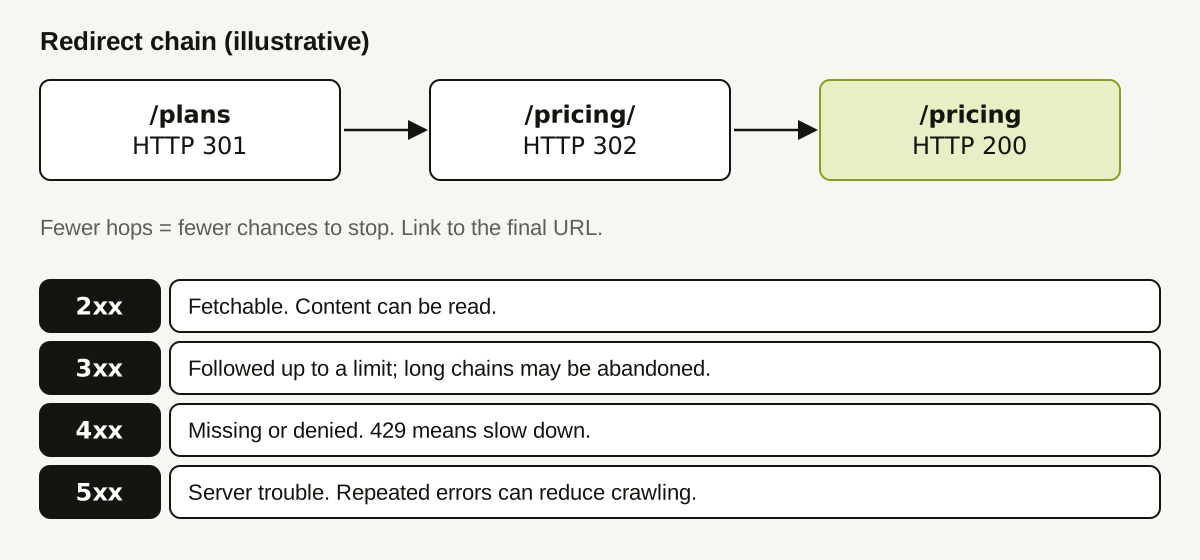
4xx: missing or denied
- 404 and 410 mean the page is not there. If the page should exist, you have a broken link or deleted content.
- 401 and 403 mean access is refused. These are the codes a security tool returns when it blocks a bot. A page can be public to browsers and refused to a crawler. Check your CDN, firewall, and bot-protection rules.
- 429 means "too many requests." A crawler may slow down or retry later.
For robots.txt specifically, Google documents that it treats 4xx responses (other than 429) as if no valid robots.txt exists, so crawling proceeds without restriction. A missing robots.txt is therefore usually harmless; a robots.txt that returns 403 deserves a look, because behavior may differ between crawlers.
5xx: the server failed
A 500, 502, 503 or 504 says the server could not respond properly. Occasional 5xx errors are normal. Sustained ones can cause crawlers to back off. For robots.txt, RFC 9309 says that when the file is unreachable because of server or network errors, a crawler must assume complete disallow. In other words, a broken robots.txt can block more than a missing one does. Verify against the RFC text for the exact conditions.
Which pages matter most
Do not audit your whole site first. Start with the pages that carry the answers you want assistants to find:
- home and pricing,
- product and comparison pages,
- the documentation pages that answer common questions,
- your best articles,
robots.txtand your sitemap.
A worked example (illustrative)
A team lists eight important URLs and checks each one with a simple command-line request that reports the final status and the number of redirects:
| URL | Final status | Hops | Finding |
|---|---|---|---|
| / | 200 | 0 | Fine |
| /pricing | 200 | 0 | Fine |
| /plans (old link in docs) | 200 | 2 | Update the link to /pricing |
| /compare/acme | 404 | 0 | Page removed, still linked from the footer |
| /docs/start | 200 | 1 | Fine; ends on a trailing slash |
| /blog/best-tools | 403 (to a bot user-agent) | 0 | Bot protection rule too strict |
| /robots.txt | 200 | 0 | Fine |
| /sitemap.xml | 500 | 0 | Investigate server error |
Four of the eight need attention, and each has a different owner: content (the footer link), web team (the bot rule and the sitemap), and documentation (the old link). The team fixes the 403 first, because it affects a page they want read, and the 500 second.
A repeatable audit
- List your 10–20 most important URLs.
- Request each as a crawler would: follow redirects, record the final status, the number of hops, and the final URL.
- Repeat the request with a bot-like user-agent string, to find rules that treat bots differently. Do this only against your own site and respect your own rate limits.
- Fix in order: robots.txt problems, 4xx/5xx on key pages, redirect chains, then cosmetic redirects.
- Update internal links to point to final URLs, not redirecting ones.
- Re-run after each deploy.
How Doclight helps
Doclight's website audit records the HTTP status and redirect chain for each page it inspects, evaluates robots.txt, and turns confirmed technical issues (such as broken internal links, sitemap entries that error, or unexpected noindex) into recommended actions with the affected URLs as evidence. Internal links are grouped by target, so one broken page is one action rather than fifty. If the audit crawler itself is blocked or refused (401, 403, 429), that is reported as a coverage limit of the audit, never as "AI bots are blocked."
It cannot tell you how a specific AI crawler would have been treated by your firewall, because the audit uses its own crawler identity. Use your server logs for that.
Sources and verification
Checked on 2026-10-12: Google's published handling of robots.txt status codes, as summarized in a search result (4xx other than 429 treated as no robots.txt; at least five redirect hops followed); RFC 9309's rule that an unreachable robots.txt means complete disallow, read through a secondary quotation, since the RFC text itself could not be retrieved in this pass. See RFC 9309 and Google's robots.txt specification. Behavior for individual AI crawlers is less documented; verify with logs. The audit table is illustrative.
Related: what robots.txt can tell you and investigating a pricing page that crawlers rarely visit.